
Mac → Mac
Run one Mac from another.
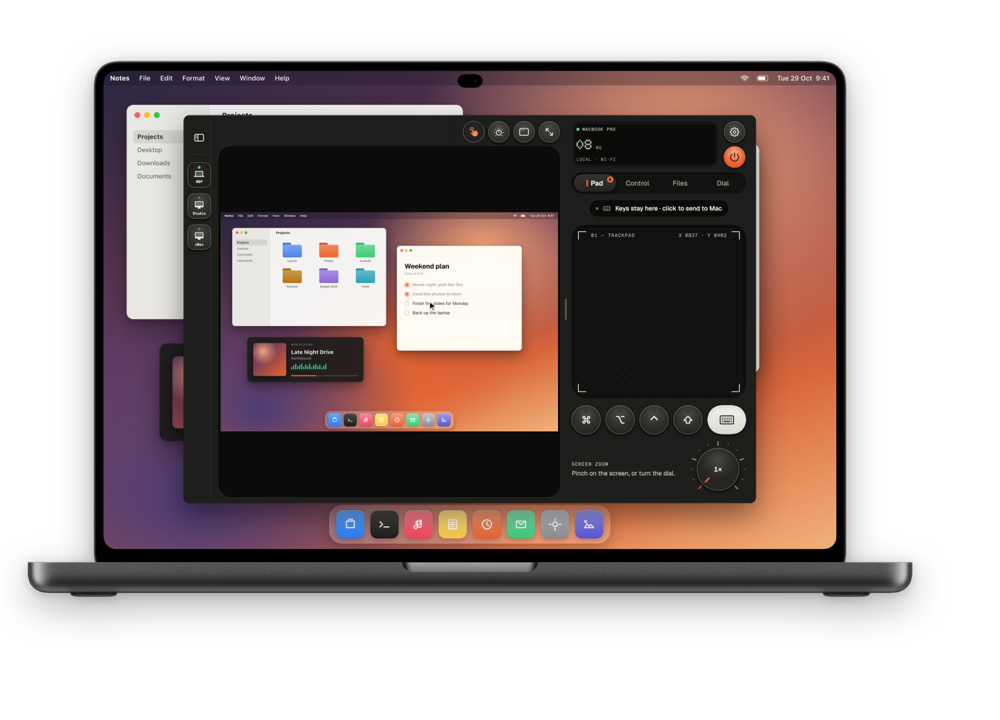
Sit at your MacBook and drive the Mac mini in the studio or the iMac in the other room: its screen live in a window, your keyboard and trackpad on it, its sound in your headphones, its files a click away.


The window, part by part.
Everything you need from the other Mac, in one window on yours.
Window
Its screen, in a window on yours.
The other Mac appears live at up to 120 fps in a window you can resize, put full screen or keep in a corner. Focus on one of its windows when that’s all you need, or make your MacBook its second display.
- HEVC video with the Mac’s audio in sync
- Use this Mac as the other Mac’s display
Input
Your keyboard and trackpad, sent across.
Click into the window and your keys, shortcuts and gestures go to the other Mac, with its own acceleration and momentum. The Dial, Key Decks and the presenter work in the window too.
- Shortcuts and modifier keys pass through
- The Dial and Key Decks in a window
Files
Its files. Your clipboard.
Browse the other Mac’s Desktop, Documents, Downloads and iCloud Drive, preview a file and bring it over. Copy on one Mac, paste on the other. Run a macro or a Shortcut without switching chairs.
- Mac file browser, files and clipboard both ways
- Macros and Mac Shortcuts with live output
One subscription
One subscription, on every device.
Thumbdial for Mac comes with the same purchase as iPhone, iPad and Apple Watch. Subscribe once with your Apple ID and Pro is on every device you use.
- iPhone, iPad, Mac and Apple Watch with one Apple ID
- Any number of Macs to control
Set it up once.
Two apps, one code, about five minutes.
- 1
Install the agent on the Mac you control
Thumbdial Agent is free, notarized by Apple, and lives in the menu bar.
- 2
Get Thumbdial on the Mac you sit at
It’s the same app, from the Mac App Store.
- 3
Pair with a code
Type the six digits, click Allow, and the other Mac opens in a window.
Questions, answered.
What do I install on which Mac?
The Mac you want to control runs the free Thumbdial Agent. The Mac you sit at runs Thumbdial from the Mac App Store.
Is the Mac app a separate purchase?
No. Thumbdial is a universal purchase: one subscription unlocks Pro on iPhone, iPad, Mac and Apple Watch with the same Apple ID.
Does it work when the Macs are on different networks?
Yes, with Pro. Link connects through our end-to-end encrypted relay, or use your own Tailscale network.
Which Macs work?
Both Macs need Apple silicon (M1 or later) and macOS 26 or later. A cable connection and Unlock with Face ID are for iPhone and iPad.
Two Macs. One desk.
Seeing the other Mac’s screen is part of Pro. New subscribers try the yearly plan free for 3 days.
Keep exploring.
- iPhone → MacPortrait first, built for one thumb. A real trackpad, the Dial, a volume knob and your Mac’s screen in your pocket.
- iPad → MacThe live screen, big. Your keyboard case types straight on the Mac, or the iPad becomes its second display.
- From anywhereOn mobile data or hotel Wi-Fi, Link reaches your Mac at home. No account, no port forwarding.
- Presentation PilotNotes, next slide, a laser for any app and time cues on your wrist.
- Second DisplayAn iPad, iPhone or Mac as an extra display, with Apple Pencil as a tablet.
- Dial, Decks and TasksA haptic jog wheel, decks of keys and your Mac’s jobs on the Dynamic Island.