
From anywhere
Your Mac stays home. You don’t have to.
Link reaches your Mac over mobile data or any Wi-Fi, through our own end-to-end encrypted relay. No account to create, no ports to open. Wake it from afar, keep its screen private while you work, unlock it with your face.


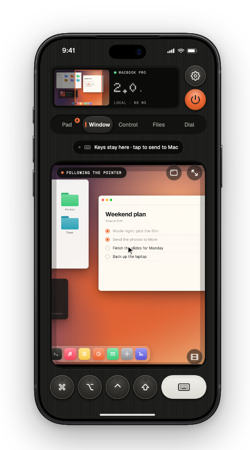
From the next room or the next city.
The route is chosen for you, and changes without dropping the session.
- LOCAL · WI-FI
Same Wi-Fi: straight to your Mac.Free
At home or at the office, your iPhone connects to the Mac directly over your network, or over a USB cable. No server is involved.
- DIRECT · P2P
Away: a direct path when the networks allow it.Pro
On different networks, Thumbdial tries to open a direct, encrypted connection between your two devices. Our server only introduces them, then steps aside.
- LINK · RELAY
Otherwise, the relay carries it, sealed.Pro
Some networks block direct paths. Then our relay passes encrypted bytes it can’t read. When a better path opens, Thumbdial moves the session over without dropping it.
No account and nothing to set up on your router. Already use Tailscale? Thumbdial works over your own network too.
Nothing to configure.
Pair at home once. Later, on mobile data or a hotel’s Wi-Fi, Thumbdial finds the Mac through Link on its own. No port forwarding, no dynamic DNS, no account. The picture adapts to the connection; Data saver keeps long sessions light.
- Works behind any router and most firewalls
- Tries the local network first, then Link
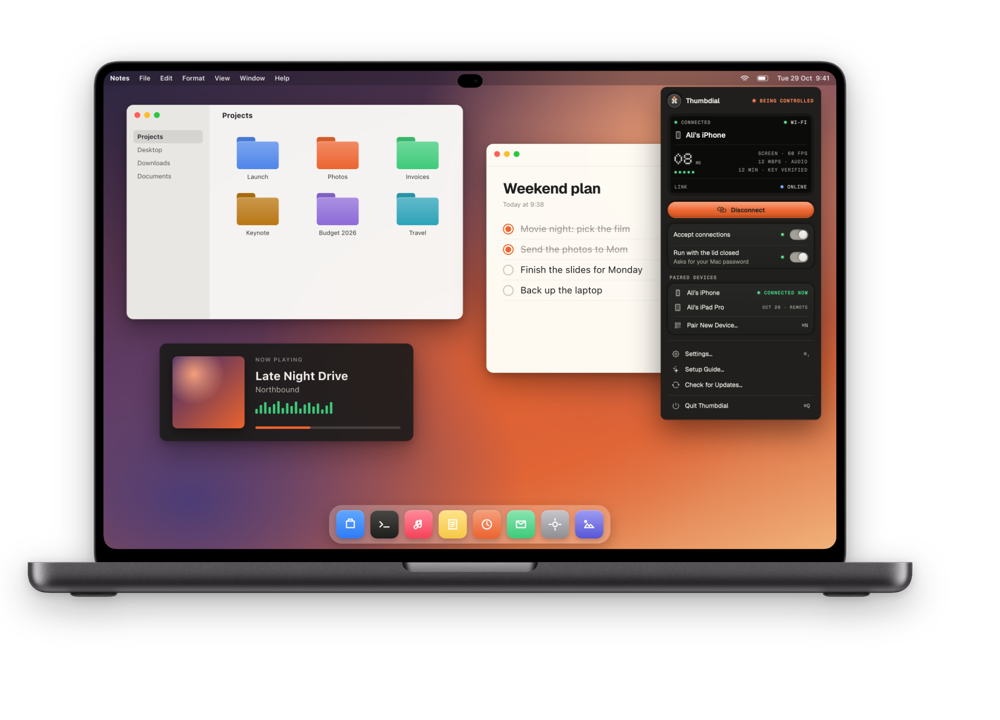
A relay that can’t read you.
Your devices encrypt everything end to end with the key they made when you paired them. The relay only passes bytes it can’t decrypt. Turn on the Privacy Curtain and the Mac’s own screen stays dark while you work on it from away.
- TLS with a pre-shared key per pair of devices
- Privacy Curtain: cover, local lock, lock on disconnect

Bring your own network.
If your devices are on a tailnet, add the Mac’s Tailscale address and Thumbdial connects over it directly. Nothing passes through our servers. Back at the desk, plug in a cable and the session moves onto it.
- Local network, cable, Tailscale and Link
- Switches routes on its own, without dropping
| Route | Plan | Our servers |
|---|---|---|
| Same Wi-Fi | Free | Not involved |
| USB cable | Free | Not involved |
| Tailscale | Free on your network, Pro from away | Not involved |
| Link | Pro | Introduce your devices, or carry encrypted bytes they can’t read |
Asleep? Wake it.
On the same Wi-Fi, Thumbdial wakes a sleeping Mac by itself. From away, it asks another Mac running Thumbdial Agent at home to wake it, then connects. Unlock with Face ID gets you past the lock screen.
- Free on the same Wi-Fi; from away with Pro
- “Don’t sleep on power” keeps a Mac reachable
Set it up once.
Two apps, one code, about five minutes.
- 1
Pair at home
Pair your iPhone or iPad with the Mac on the same Wi-Fi, once.
- 2
Turn on Pro
Link comes with Pro. There’s nothing to sign up for and nothing to configure.
- 3
Keep the Mac reachable
Turn on “Don’t sleep on power” in Thumbdial Agent, or let another Mac at home wake it.
Questions, answered.
Do I have to open ports on my router?
No. Both devices connect out to the Link relay, so there’s no port forwarding, dynamic DNS or VPN to set up.
Can the relay see my screen?
No. Everything is encrypted end to end with your devices’ pairing key. The relay only forwards encrypted bytes. It keeps a content-free operations log without IP addresses; the privacy policy lists exactly what it processes and for how long.
Can I wake a sleeping Mac from far away?
Yes, with Pro, if another Mac running Thumbdial Agent is awake on the same network: it wakes the sleeping Mac for you. On the same Wi-Fi, waking is free. A Mac that is shut down can’t be started remotely. With one Mac, turn on “Don’t sleep on power” and leave it plugged in.
Link or Tailscale: which is faster?
Link has fair-use limits: up to 4 Mbit/s per paired Mac, and 2 Mbit/s after 60 GB in a month. If you already use Tailscale, it connects directly and may give you a sharper picture away from home.
Leave the Mac. Take the session.
Free on your Wi-Fi, over USB and with Tailscale at home. Pro adds Link for everywhere else.
Keep exploring.
- iPhone → MacPortrait first, built for one thumb. A real trackpad, the Dial, a volume knob and your Mac’s screen in your pocket.
- iPad → MacThe live screen, big. Your keyboard case types straight on the Mac, or the iPad becomes its second display.
- Mac → MacRun the Mac mini in the studio from the MacBook on your lap, in a window, with its sound.
- Presentation PilotNotes, next slide, a laser for any app and time cues on your wrist.
- Second DisplayAn iPad, iPhone or Mac as an extra display, with Apple Pencil as a tablet.
- Dial, Decks and TasksA haptic jog wheel, decks of keys and your Mac’s jobs on the Dynamic Island.